KASANESTkasanest
Overlay old and new drawings.
Overlay them, and only the lines that changed get colored.
- Misaligned drawings? Pick a line, and the position is corrected
- A0 size, or 10 m long
- Your drawings never leave your PC. Single exe, no installation
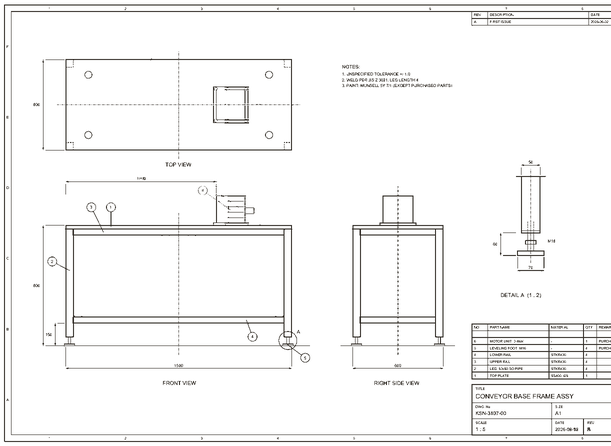
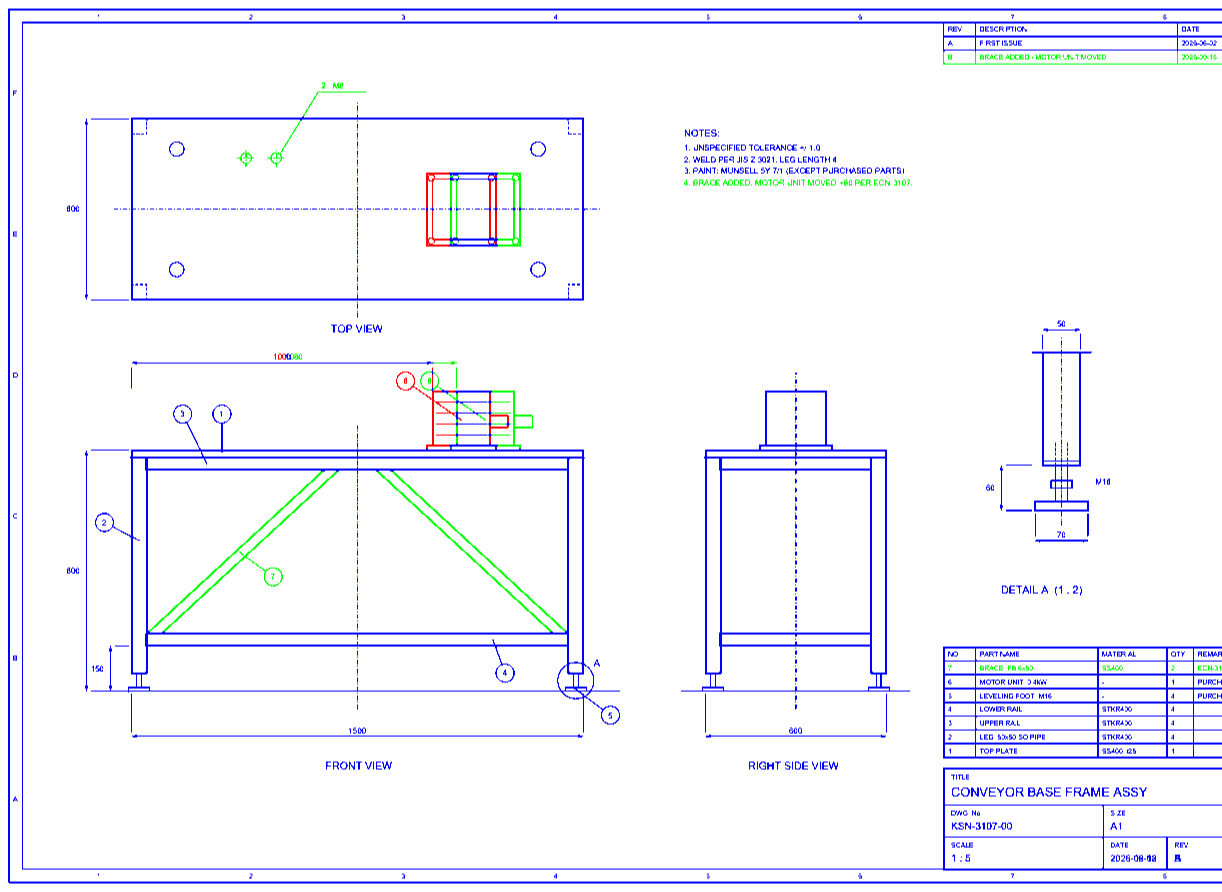
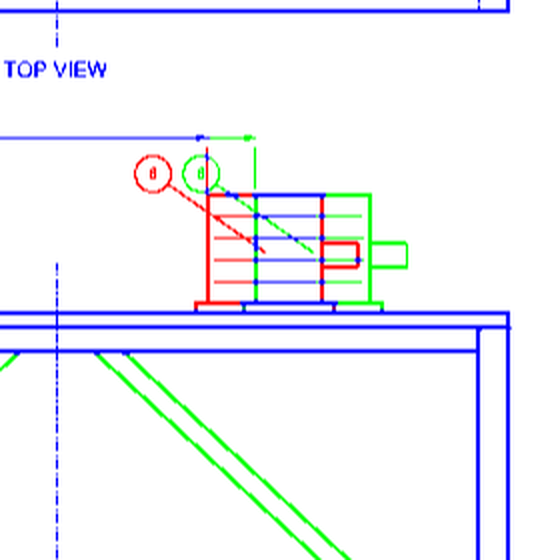
In the free edition, a few features are marked with a "🔒 Paid" label. Loading drawings, overlaying, viewing differences, aligning, zooming, and adding comments all remain available in the free edition. See what's different
Features
Cut the time it takes to confirm "did this really not change?"
A0 size, or 10 m long — no problem
Works with large-format drawing PDFs up to A0 size and 10 m long. Overlay the old and new drawings and see the changes highlighted in color.
Alignment by picking a single line
Pick a line on the drawing to use as a reference, and misaligned old and new drawings snap into place. After aligning, you can fine-tune with panning and 0.01° rotation, with a step size you can set to match the job (moves can be set in pixels or millimeters). Scale mismatches can also be corrected when needed.
Export the overlay straight to PDF
Export the overlaid comparison result as a PDF, with the differences still visible, for sharing, reporting, or record-keeping. (A paid-edition feature.)
The same input always gives the same result
Difference detection is rule-based and deterministic, comparing pixels and shapes directly. It doesn't use AI inference, so it has the reproducibility that drawing checks require.
Your drawings never leave your PC
Loading, comparing, viewing, and exporting all happen entirely on your PC. Drawing data and file names are never sent anywhere.
Single exe, no installation required
Runs from a single executable file — no installer, no extra runtimes. No administrator rights or registry changes needed, which keeps the bar low for deploying it on a company PC.
Search and jump to the spot you need
Search text embedded in the drawing and jump straight to it. For multi-page PDFs, you can choose which pages to compare — for example, old page 2 against new page 4 — and alignment is kept per pair.
Leave a note right where you noticed it
Write comments tied to a position on the drawing, and track them by status (New / In review / Checked / Done). The list can be exported to CSV. You can bundle the drawing and comments into a single file to hand to someone else, and receive their reply back (saving is a paid-edition feature; replying to a file you received works in the free edition too).
Even when misaligned, just pick one line
Even if the drawings were printed or scanned at different positions, picking a reference line brings them into alignment.
-
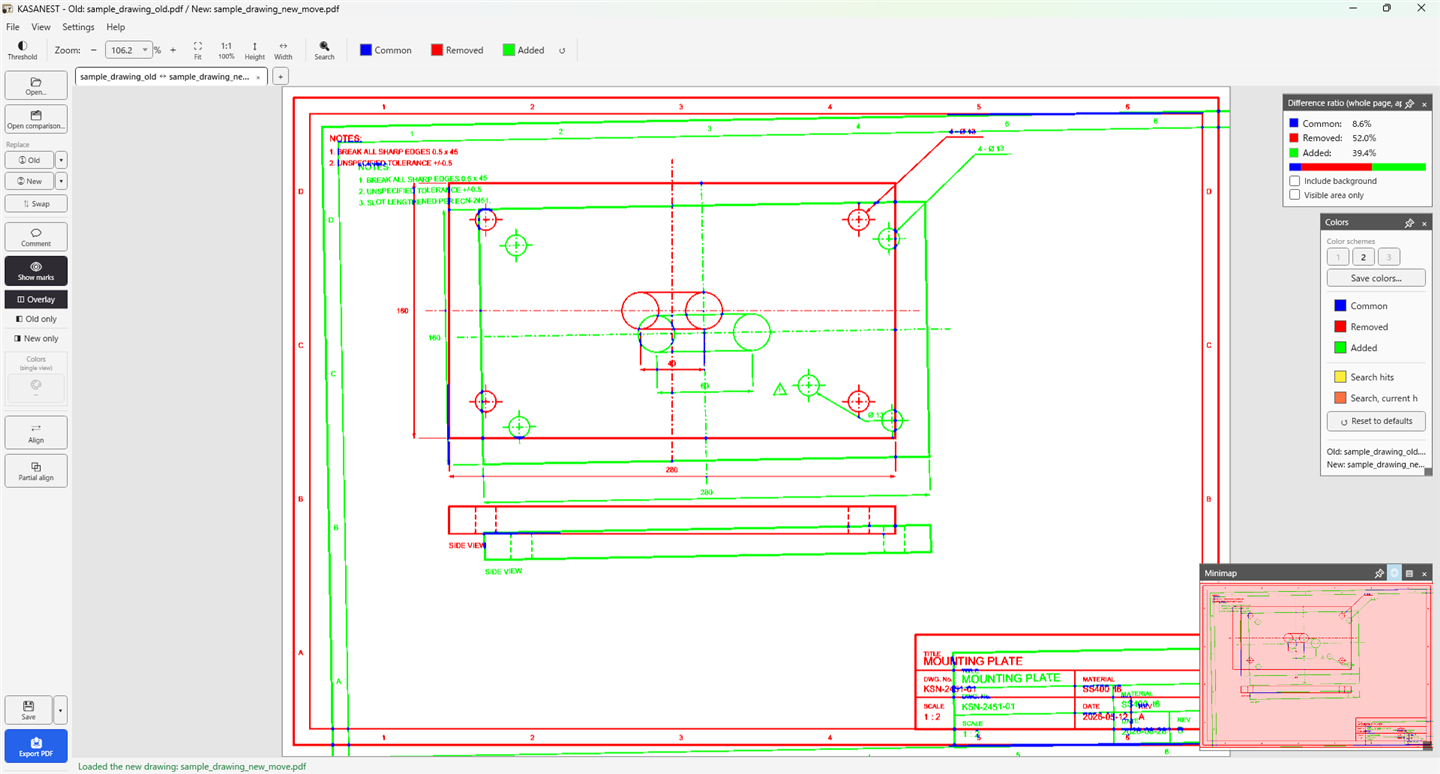 1Overlaid as-is, the entire offset shows up as a difference.
-
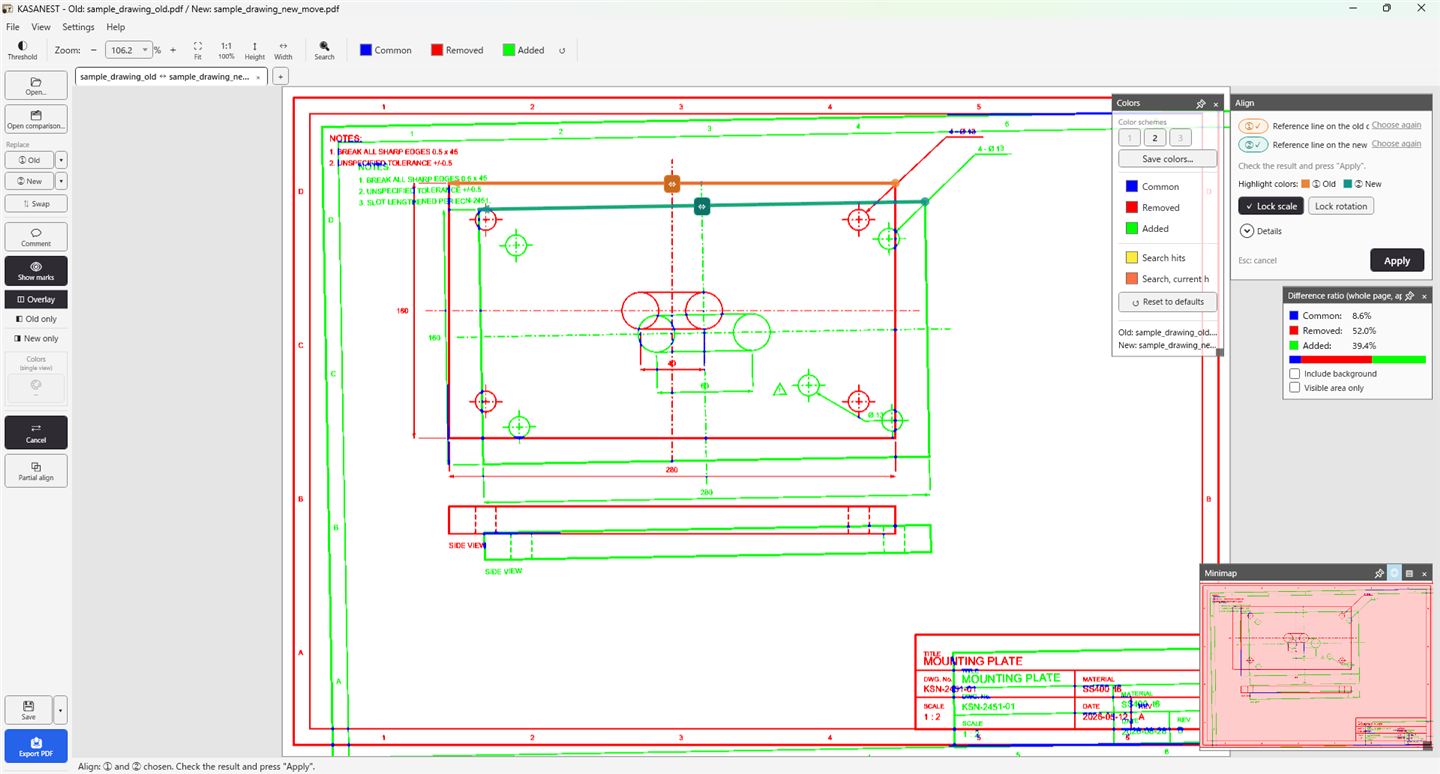 2Pick one corresponding line on the old drawing and one on the new drawing. Rotation and scale mismatches can be corrected at the same time, only when needed.
-
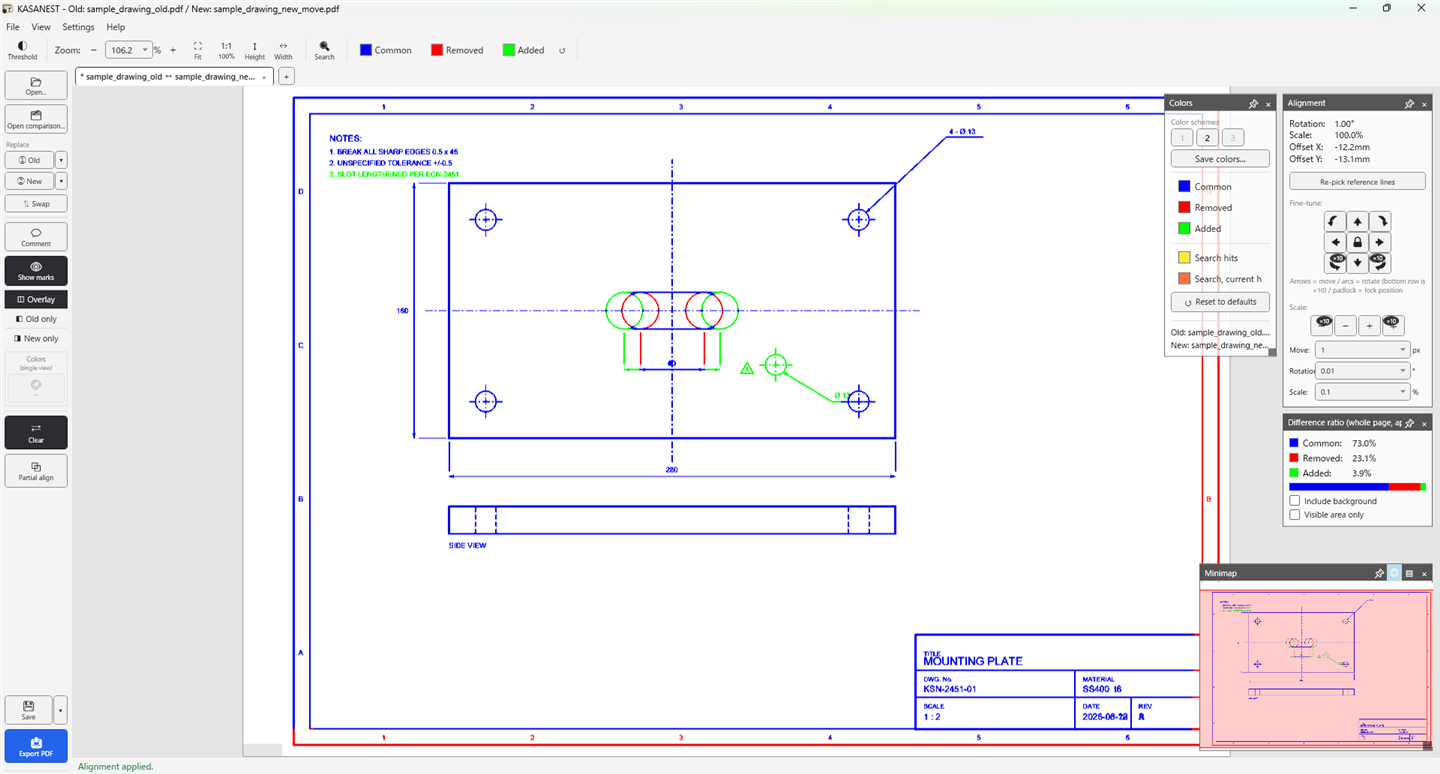 3Choosing "Apply" aligns the drawings, and only what actually changed remains. In this example, a 1.00° rotation was corrected at the same time.
Free edition and paid edition
Viewing and checking work fully in the free edition. If you only need to look at the result, it stays free forever.
| Feature | Free edition | Paid edition |
|---|---|---|
| Load, overlay, and highlight differences between old and new PDFs | ✓ | ✓ |
| Alignment (reference-line based), zoom, minimap | ✓ | ✓ |
| Text search within the drawing, comparing chosen page pairs | ✓ | ✓ |
| Comments, status tracking, CSV export | ✓ | ✓ |
| Color scheme changes (including custom colors), color-vision-friendly presets | ✓ | ✓ |
| Light / dark screen theme | ✓ | ✓ |
| Export and import settings | ✓ | ✓ |
| Export the overlay result to PDF (high resolution, large-format supported) | — | ✓ |
| Save comparisons (bundled into a single file with comments) | Replying to a received file only | ✓ |
| Remembering color schemes (save/load presets, carried over on next launch) | — | ✓ |
| Changing how many "recent files" are remembered | — | ✓ |
*Paid features can be trialed free for 7 days starting from when you choose "Start trial" (the trial doesn't start automatically).
Pricing
This is our early-release pricing. If we ever change it, we'll announce it on this page beforehand.
Payment is by credit card (Stripe). For both the perpetual license and the monthly plan, we email you a license key as soon as payment completes (usually within a minute).
Free edition
- View, compare, align
- Enough to confirm the result
- No time limit
Perpetual license
- All features, no time limit
- No renewal fees or extra charges
- Transferable when you replace your PC (via support)
Monthly plan
- For when you only need it this month
- Cancel anytime
- Switch to the perpetual license freely
If you purchase the perpetual license while on the monthly plan, the monthly plan is cancelled automatically (no further charges).
Paid licenses are currently sold in Japan only. If you would like to purchase from outside Japan, please contact us.
Safe to use on a company PC
We publish the information your IT department needs for review.
- The only outbound connections are "license activation (key and device hash only)" and "checking for updates." Drawing data is never sent, under any circumstances
- Works offline for up to 14 days after the last successful activation. After that, it keeps working as the free edition (it is never forcibly disabled)
- A code-signing certificate (OV) is currently being obtained, and the version currently distributed is unsigned. You'll see an "unknown publisher" warning at launch, which you can proceed past (a signed build will be provided once the certificate is issued)
- An IT-department guide (connection destinations and data handling in detail) is available Download the PDF (A4, 3 pages — in Japanese)
Download and system requirements
Start with the free edition. You can enter a license key later at any time.
| Supported OS | Windows 10 / 11 (64-bit) |
|---|---|
| Setup | A single executable file. No installer, extra runtime, administrator rights, or registry changes required |
| Version | v1.0.2 (released October 7, 2026) |
| File size | About 71 MB |
| Distribution | The same file is used for the free and paid editions. Entering a license key unlocks the paid-edition features (no reinstall needed) |
| Network access | License activation and update checks only. Drawing data is never sent |
FAQ
When downloading, I see "This isn't commonly downloaded" and can't save the file
Because the code-signing certificate is still being obtained, your browser (Microsoft Defender SmartScreen) flags this as a file with few downloads. It isn't a sign that anything is wrong with the file itself. In Microsoft Edge, you can save it with the steps below.
x.x.x in the figure below stands in for it).
In steps 3 and 4, "More info" just opens Microsoft's explanation page about SmartScreen — it isn't part of the save process. The figures above recreate the look of Microsoft Edge; they aren't actual screenshots. Other browsers offer similar options from their downloads list, though the wording and layout differ. The x.x.x in the figures stands for whatever version you downloaded (for example, 0.9.1). Once the certificate is issued and we switch to signed builds, these warnings will no longer appear.
I saw an "unknown publisher" warning on first run
The version currently distributed is unsigned, since the code-signing certificate is still being obtained, so Windows shows a SmartScreen warning. Choose "More info" → "Run anyway" to launch it. If you're using it on a company PC, please share this page and the IT-department guide with your IT department. A signed build will be provided once the certificate is issued.
What happens to my license if I replace my PC?
You can move it to the new PC. Since we need to release the registration on the old PC, please contact support. You can copy the diagnostic info from the app's license screen and send it to us (it doesn't include your license key). We'll release the old registration so you can keep using the license on the new PC right away. Unless we suspect misuse, there's no limit on how many times you can transfer it.
*We deliberately don't auto-release a registration from the app itself. The app has no way to know which PC is the "old" one, and we'd risk releasing the wrong PC you're still actively using.
When and how will I receive my license key after purchasing?
Once payment completes, we automatically email a license key to the address you entered on the Stripe checkout screen (usually within a minute or so). The sender is support@harinest.jp. If it doesn't arrive, please check your spam folder and contact support — we'll resend the key.
How do I cancel the monthly plan?
You can cancel anytime yourself from the link in your purchase email (customer page). After cancelling, you can keep using it until the end of the current billing period (no prorated refund). If you can't find the link, please contact support. If you purchase the perpetual license while on the monthly plan, the monthly plan is cancelled automatically and no further charges occur.
Could the monthly plan price change?
We may revise the price. If we raise it, current subscribers keep their existing price for at least 3 months, and we'll email you at least 30 days before the switch. If we lower it, current subscribers also get the new price from their next renewal.
Can I get a refund?
Given the nature of the product, purchases are not eligible for refunds in principle. Before buying, please use the 7-day free trial to confirm it works with the drawings you use at work.
Can I just keep using the free edition indefinitely?
Of course. The free edition has no time limit, and the trial period doesn't start unless you choose "Start trial." If you only need to view comparison results within your company, the free edition is all you need.